
Techfullpost

Microsoft’s SwiftKey Keyboard Gets New AI-Powered Features

Microsoft's SwiftKey Keyboard Gets New AI-Powered Features

Microsoft has announced a new set of AI-powered features for its SwiftKey keyboard app. The new features are designed to help users compose and spice up their text and images, and are now rolling out for iPhone, iPad, and Android devices.

Here is a more detailed look at the new features:

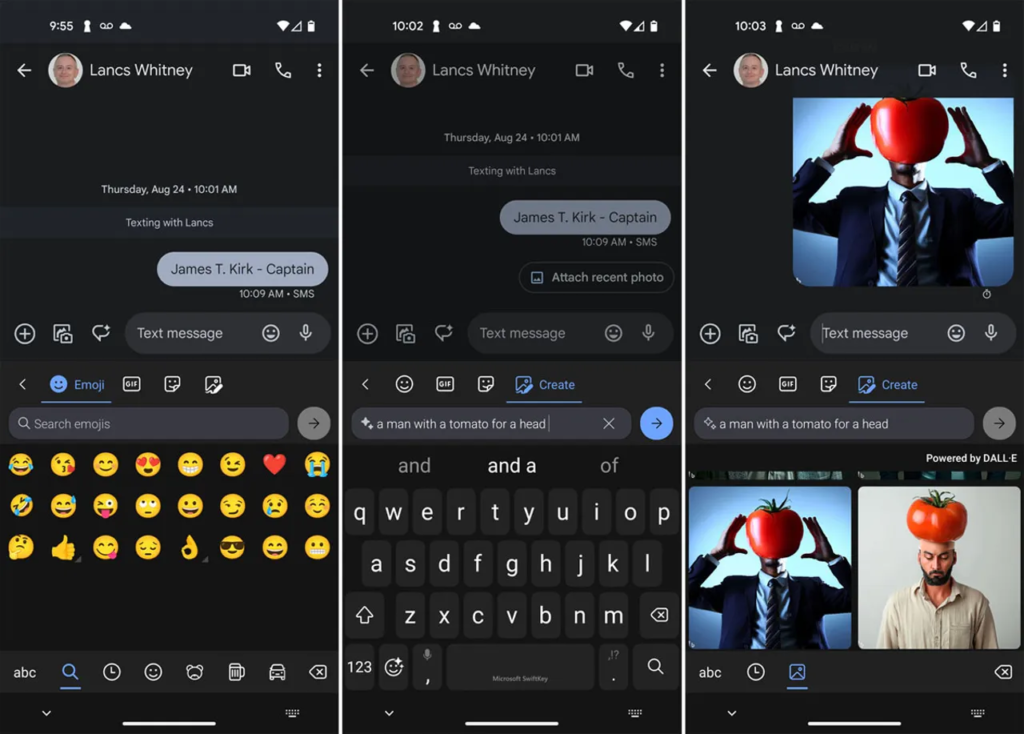
Bing AI image generator: This feature allows users to generate images using text descriptions. To use it, simply tap the Emoji icon in the Bing toolbar and then tap the Create icon. In the text field, describe the type of image you want created, and then tap the arrow to submit your request. You can then select one of the generated images and send it to your recipient.

AI camera lenses:
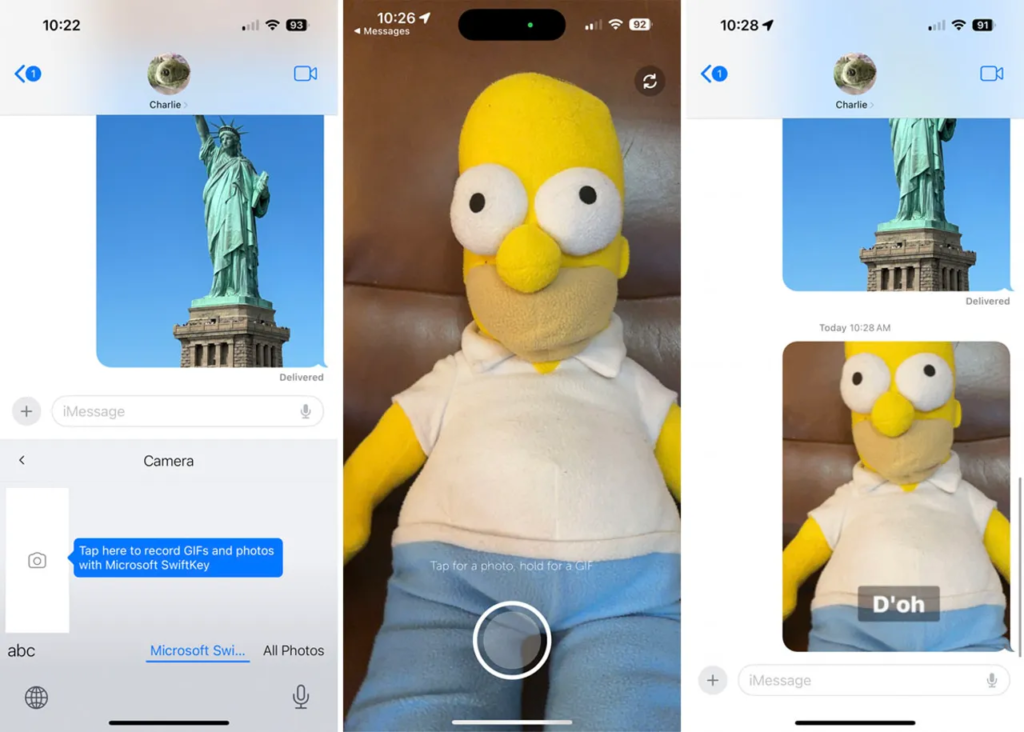
This feature allows users to create photos, videos, and GIFs with different effects. To use it, simply tap the icon with the four squares or the three dots to view all the available options and then select Camera. Tap the area indicated to record GIFs and photos with Microsoft SwiftKey. After the camera app opens, tap the shutter button to take a photo, or hold it down to create a GIF. When done, stop the recording. You can then add text and effects. When done, tap Save. Copy and paste your photo or GIF into the message and then send it.

Personalize stickers:
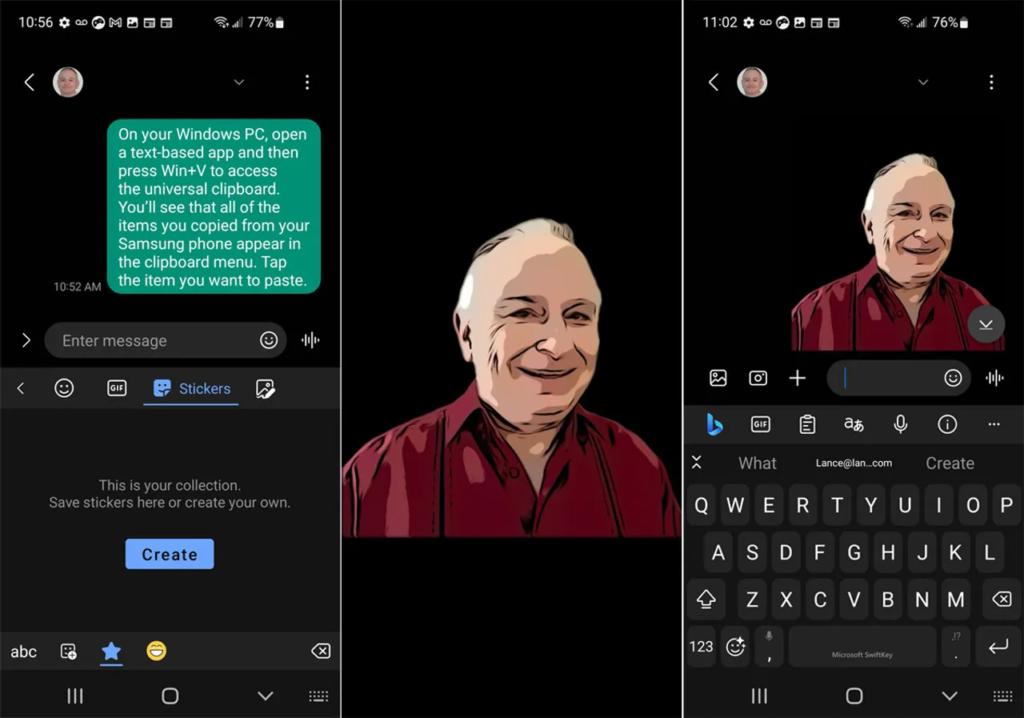
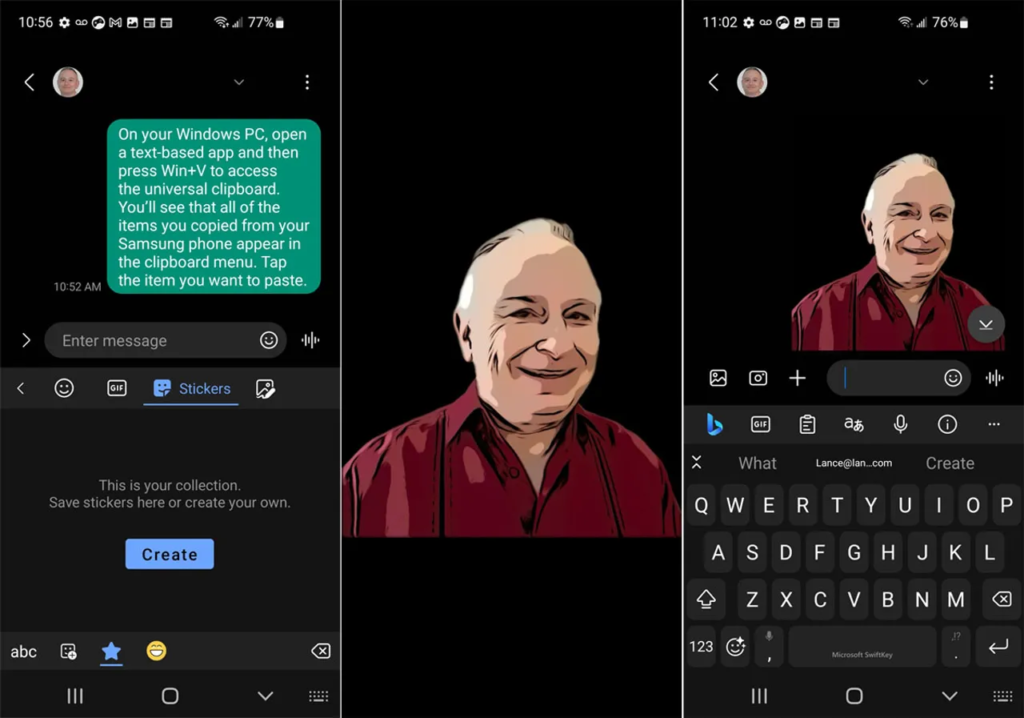
This feature allows users to create custom stickers from their own photos. To use it, tap the icon with the four squares or the three dots and select Stickers. If the new feature is accessible, you should see a button to Personalize Stickers. After you tap that button, the camera app opens where you can take a picture that is then turned into a sticker. Select the sticker to send it to someone.

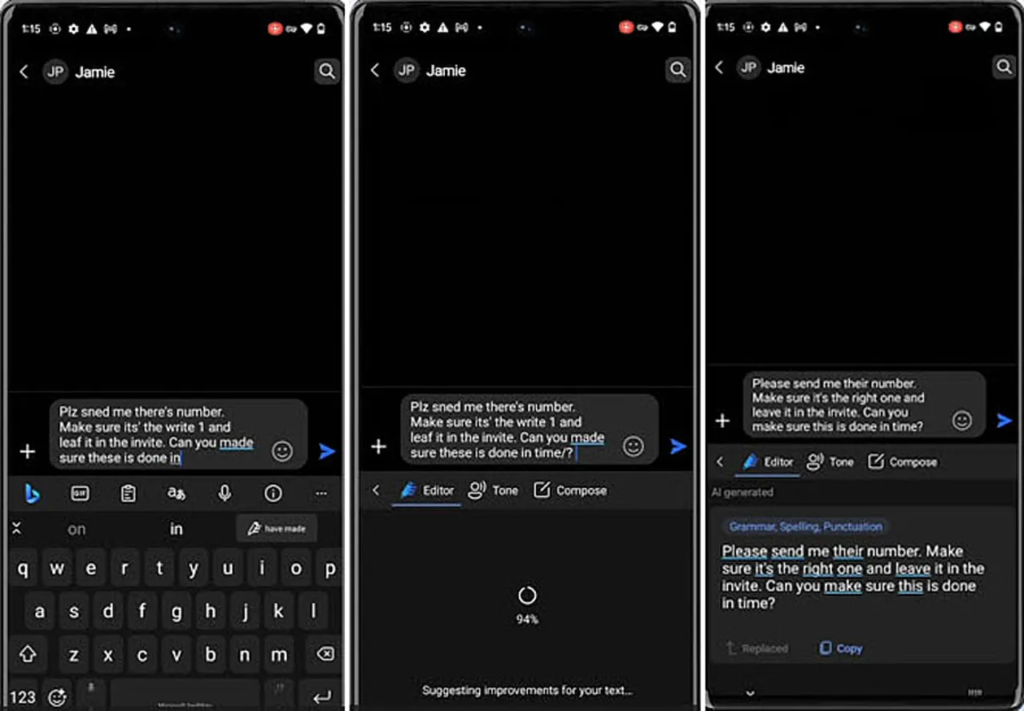
Editor:
This feature acts as a type of virtual proofreader to check your grammar, spelling, and punctuation. To use it, simply highlight any sentence you’ve typed and then tap the Bing icon and choose the option for Editor. In response, the AI will offer feedback and suggestions to correct any mistakes or improve your writing style.

The new features are still rolling out, so you may not yet be able to access them on your phone or tablet. But they’re all part of Microsoft’s ongoing efforts to infuse AI into its products, both major and minor.
In addition to the new features, Microsoft is also continuing to improve the existing AI-powered features in SwiftKey. For example, the Bing AI chatbot can now provide more personalized suggestions, and the AI writing assistant can now help you to improve your writing style in more ways.

Overall, the new AI-powered features in SwiftKey are a welcome addition. They make it easier for users to compose and spice up their text and images, and they make SwiftKey an even more powerful tool for communication.


ADVERTISEMENT
RECOMMENDED
NEXT UP

Apple’s entry-level iPad has just become its most compelling deal ever, dropping to a **record-low price of 299∗∗(normally299∗∗(normally349) at major retailers including Amazon, Walmart, and Best Buy. For anyone needing a reliable, no-frills tablet for everyday tasks—streaming, web browsing, light productivity, and video calls—this is one of the best tech bargains of the year.

What’s New in the 11th-Gen iPad?

Compared to its predecessor, Apple’s latest budget iPad brings meaningful upgrades that make it a much better long-term investment:

✔ A16 Bionic Chip – The same processor powering the iPhone 14, delivering smoother performance for multitasking and apps.
✔ 128GB Base Storage – Double the 64GB of the 10th-gen model—no more constant storage anxiety.
✔ 11-inch Liquid Retina Display – More screen space for movies, reading, and productivity.
✔ Improved 12MP Front Camera – Better for Zoom calls and FaceTime.
✔ USB-C Apple Pencil Support – Great for note-taking and light creative work.

Who Should Buy This iPad?

✅ Students – Perfect for note-taking (with Apple Pencil), research, and streaming lectures.
✅ Casual Users – Ideal for browsing, social media, and video streaming.
✅ Remote Workers – A solid secondary device for emails, Slack, and video calls.
✅ Families – A durable, long-lasting tablet for kids’ entertainment and learning.

What You’re Missing (And Why It Might Not Matter)

As Apple’s most affordable tablet, the 11th-gen iPad lacks some premium features:

❌ No Apple Intelligence (AI Features) – Only newer iPads (Pro, Air) support Apple’s upcoming AI tools.
❌ No Apple Pencil Pro Support – The USB-C Pencil works fine, but you miss extras like Find My and squeeze gestures.
❌ Non-Laminated Display – Slightly thicker bezels and less premium feel than the iPad Air.

But here’s the thing: If you just need a fast, dependable tablet without the bells and whistles, these omissions won’t affect your experience.

Is This the Best Budget Tablet in 2024?

iPad vs. The Competition

Feature11th-Gen iPad ($299)Samsung Galaxy Tab S9 FE ($399+)Amazon Fire Max 11 ($229)
PerformanceA16 Bionic (Very Fast)Exynos 1380 (Mid-Range)Mediatek (Basic)
Display11″ Liquid Retina10.9″ LCD11″ LCD
Stylus SupportUSB-C Apple PencilS Pen IncludedNo Precision Stylus
SoftwareiPadOS (5+ Years Updates)One UI (Slower Updates)Fire OS (Limited Apps)
Best ForAll-around useAndroid fansPrime Video & Kindle users

Verdict: If you want long-term software support, better performance, and Apple ecosystem benefits, the iPad is still the best value.

Final Recommendation

For $299, the 11th-gen iPad is a no-brainer for casual users. It’s fast enough for daily tasks, has great battery life, and will receive updates for years. Unless you need AI features or a pro-level stylus, this is the best cheap iPad deal right now.

In a major win for smart home enthusiasts, SwitchBot has announced plans to integrate over 45 of its products with Home Assistant in the first half of 2024. This move, confirmed in an email to The Verge, underscores SwitchBot’s commitment to interoperability and user flexibility in the rapidly evolving smart home ecosystem. Among the highlighted devices is the highly anticipated SwitchBot Hub 3, which was recently revealed in a filing with the Connectivity Standards Alliance.

What’s New in SwitchBot’s Home Assistant Integration?

SwitchBot’s integration rollout, set to begin in April, will include some of its most popular devices, such as:

  • Robot Vacuum K10 Plus Pro: A powerful cleaning solution that can now be seamlessly controlled via Home Assistant.
  • Curtain 3 Smart Shades: Automate your window treatments with precision and ease.
  • Garage Door Opener: Add your garage to your smart home network for enhanced security and convenience.

These new integrations will join existing SwitchBot devices like the SwitchBot Lock Pro, which already supports Home Assistant. This expansion not only enhances the functionality of SwitchBot’s ecosystem but also solidifies its position as a leader in the smart home industry.

Why This Matters for Home Assistant Users

Home Assistant, an open-source platform beloved by tech-savvy users, thrives on its ability to unify devices from various brands under one roof. However, integrations with major smart home players can often be fragile. Companies sometimes make undocumented software changes or actively block third-party integrations, leaving users frustrated.

SwitchBot’s proactive approach to integrating its devices with Home Assistant is a breath of fresh air. By officially supporting these integrations, SwitchBot ensures a stable, reliable, and user-friendly experience. This is particularly important for Home Assistant users who value customization and control over their smart home setups.

The Bigger Picture: A Shift Toward Open Ecosystems

SwitchBot’s announcement reflects a growing trend in the smart home industry: the push for open ecosystems and interoperability. As more consumers demand seamless integration across devices, companies like SwitchBot are stepping up to meet these expectations. This move not only benefits users but also fosters innovation and competition in the market.

For Home Assistant users, this means greater flexibility and fewer headaches. Instead of relying on fragile community-created integrations, they can now enjoy official support for a wide range of SwitchBot devices. This is a win for both convenience and reliability.

What’s Next for SwitchBot and Home Assistant?

With the first wave of integrations launching in April, users can look forward to a more cohesive and powerful smart home experience. The inclusion of devices like the Robot Vacuum K10 Plus Pro and Curtain 3 Smart Shades demonstrates SwitchBot’s dedication to enhancing everyday life through technology.

As the smart home landscape continues to evolve, partnerships like this one between SwitchBot and Home Assistant will play a crucial role in shaping the future of connected living. For now, smart home enthusiasts have plenty to be excited about as SwitchBot brings its innovative products into the Home Assistant fold.

ADVERTISEMENT
Receive the latest news

Subscribe To Our Weekly Newsletter

Get notified about new articles