Techfullpost

How to Activate and Manage Hulu on Your Devices with Ease

hulu/techfullnews

Streaming has revolutionized how we consume entertainment, but logging into your favorite apps hasn’t always been a seamless experience. Remember the days of painstakingly typing your username and password using an on-screen keyboard on your smart TV? Thankfully, those frustrating moments are largely behind us. Today, most streaming platforms, including Hulu, have streamlined the activation process, making it faster and more user-friendly.

In this guide, we’ll walk you through how to activate Hulu on your smart TV or streaming device, as well as how to manage and remove devices from your account. Whether you’re a seasoned streamer or new to the world of on-demand entertainment, these tips will help you get the most out of your Hulu experience.


The Evolution of Streaming Device Activation

image 159

Gone are the days of struggling with clunky on-screen keyboards. Modern streaming services like Hulu have adopted a more efficient approach: web-based activation. This method involves entering a unique activation code on a dedicated website, eliminating the need to type lengthy credentials on your TV.

Here’s why this method is a game-changer:

  • Speed: No more tedious typing—just a quick code entry.
  • Convenience: Use your smartphone, tablet, or computer to complete the process.
  • Security: Reduces the risk of errors and ensures a smoother login experience.

While some platforms, like Google TV, offer syncing with your phone’s keyboard, web-based activation remains the gold standard for simplicity and efficiency.


How to Activate Hulu on Your Smart TV or Streaming Device
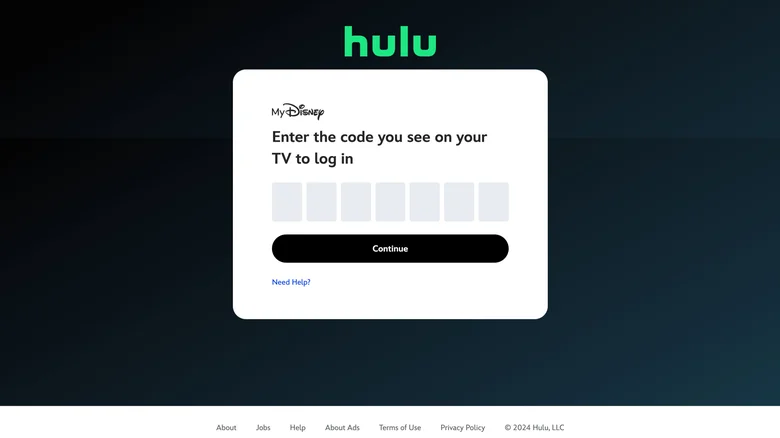
image 160

Activating Hulu on your device is a straightforward process. Whether you’re using a smart TV, Roku, Amazon Fire Stick, or gaming console, the steps are largely the same. Here’s how to do it:

Step-by-Step Activation Guide

  1. Open the Hulu App: Navigate to the Hulu app (or channel, if you’re using a Roku device) on your smart TV or streaming device.
  2. Select Log In: When prompted, choose the “Log In” option on the splash screen.
  3. Get Your Activation Code: Select “Activate on a Computer” to generate a unique activation code displayed on your TV.
  4. Visit Hulu’s Activation Page: On a separate device with a web browser (like your smartphone, tablet, or computer), go to hulu.com/activate.
  5. Log In to Your Account: If you’re not already logged in, enter your Hulu username and password.
  6. Enter the Activation Code: Input the code shown on your TV into the provided form on the activation page.
  7. Complete the Process: Within 30 seconds, your TV or streaming device will refresh, and you’ll be logged in and ready to stream.

That’s it! You can now enjoy Hulu’s vast library of TV shows, movies, and original content on your preferred device.


Why Activation Codes Are a Win for Users

Activation codes aren’t just a convenience—they’re a testament to how streaming services are evolving to meet user needs. Here’s why this method stands out:

  • Cross-Device Compatibility: Whether you’re using a smart TV, gaming console, or streaming stick, the process remains consistent.
  • User-Friendly: No more frustration with on-screen keyboards or remote controls.
  • Secure: Reduces the risk of unauthorized access by simplifying the login process.

How to Remove a Device from Your Hulu Account

Over time, you may need to manage the devices linked to your Hulu account. Whether you’re upgrading your hardware, selling an old device, or simply cleaning up your account, Hulu makes it easy to remove devices. Here’s how:

Step-by-Step Device Removal Guide

  1. Visit Your Hulu Account Page: Go to Hulu’s Account page and log in if prompted.
  2. Navigate to Manage Devices: Under the “Your Account” section, click or tap on “Manage Devices.”
  3. Remove Unwanted Devices: Review the list of devices linked to your account. If you see any you no longer use or recognize, click or tap “Remove” next to each one.
  4. Confirm the Changes: Once removed, the device will no longer have access to your Hulu account.

Why Remove Devices?

  • Security: Protect your account by removing devices you no longer use.
  • Account Management: Keep your device list clean and organized.
  • Parental Control: Restrict access to specific devices if needed.

Pro Tips for a Seamless Hulu Experience

  1. Keep Your Account Secure: Regularly review and manage the devices linked to your Hulu account to prevent unauthorized access.
  2. Use Strong Passwords: Pair Hulu’s activation process with a strong, unique password for added security.
  3. Explore Hulu’s Library: From classic shows like Law & Order to Hulu Originals, there’s always something new to discover.
  4. Check for Updates: Ensure your Hulu app and streaming device software are up to date for the best performance.

Stream Smarter, Not Harder

Activating and managing Hulu on your devices doesn’t have to be a hassle. With web-based activation codes and easy device management tools, Hulu has made it simpler than ever to enjoy your favorite shows and movies. Whether you’re setting up a new device or cleaning up your account, these steps ensure a smooth and secure streaming experience.

By following this guide, you’ll not only save time but also gain peace of mind knowing your account is secure and optimized for your viewing pleasure. So grab your remote, activate Hulu, and dive into a world of endless entertainment!
ADVERTISEMENT
RECOMMENDED
NEXT UP

Apple TV+ has quietly pulled the upcoming French thriller The Hunt from its streaming release schedule amid allegations that the series bears a striking resemblance to Shoot, a 1974 novel by American author Douglas Fairbairn. The move, which was first reported by Apple Insider, has sparked an industrywide debate about originality and intellectual property rights in light of increased scrutiny on global streaming content.

The series was scheduled to launch on December 3, but eagle-eyed viewers observed last week that the title had vanished altogether from the upcoming releases list on Apple TV+. Production company Gaumont has now confirmed the delay in a statement to Variety:

“The broadcast of our series The Hunt has been temporarily postponed. We are currently conducting a thorough review to address any questions related to our production. We take intellectual property matters very seriously.”

Plot Parallels Raise Red Flags

The plagiarism concerns emerged after French media journalist Clément Garin openly stated that the plot of The Hunt has striking similarities with Fairbairn’s Shoot, itself adapted into a feature film in 1976.

In The Hunt, the story revolves around Franck — played by Benoît Magimel — and a close-knit group of friends who enjoy weekend hunting trips. Their routine outing turns sinister when they encounter another group of hunters who inexplicably open fire on them. After one of Franck’s friends is injured, the group retaliates, wounding an attacker. The men flee and decide to keep the incident secret. But as days pass, Franck becomes convinced that he and his friends are being stalked — hunted in return — by the rival group determined to exact revenge.

An official logline describes a tense psychological spiral in which Franck tries to resume normal life with his wife, Krystel (played by Audrey Laurent), only to feel increasingly surveilled and unsafe.

A Strikingly Similar Story in Shoot

Fairbairn’s Shoot follows a thoroughly similar trajectory of events. The protagonist of the novel, Rex, is introduced as a gruff, hyper-masculine hunter. While on a trip in Canada, Rex and his friends are attacked by fellow hunters. One friend fires back, killing one of the aggressors.

Rather than report the killings to the police, Rex assumes that neither would the opposing group report the lethal encounter. But paranoia takes hold as he’s convinced the surviving hunters will want revenge.

That uncanny overlap in plot structure – two groups of hunters, an exchange of gunfire, a death, and a lingering fear of revenge – fueled the accusations that ultimately prompted Apple TV+ to halt the release.

A History of Content Review at Apple TV+

image 11

This is not the first time that Apple TV+ has delayed a series amidst concerns or external scrutiny. In September, it delayed The Savant, a thriller starring Jessica Chastain as an undercover investigator tracking online hate groups planning domestic terror attacks. There wasn’t any explanation by Apple over whether the issues were creative, legal, or production-related.

The streamer has made its name by carefully curating quality, highly-vetted content and often choosing delays over controversy. This latest pause would seem to indicate Apple is continuing that cautious approach.

Thus far, neither Apple nor Gaumont has issued further information about the investigation or whether The Hunt will be put back onto the release schedule. Neither company responded to a request for comment.

The entertainment industry has continued to grapple with intellectual property challenges, especially as international productions reach a global audience on wider levels thanks to streaming platforms. Cases like The Hunt highlight the delicate balance between creative inspiration and possible infringement-and the growing pressure on studios to ensure their stories don’t cross legal or ethical lines. The Hunt has remained off Apple’s platform pending review and its future remains uncertain.

Nintendo is officially moving into a new era. In its just-posted financial results briefing, the gaming giant confirmed that it’s shifting its main development efforts to the Nintendo Switch 2, a decisive move away from the original 2017 Switch that rebooted the company’s fortunes.

“Going forward, we will shift our primary development focus to Nintendo Switch 2 and expand our business around this new platform,” Nintendo said during its briefing.

The announcement effectively signals that the Nintendo Switch’s eight-year reign is beginning to wind down, even if the company isn’t ready to retire the console completely just yet.

Switch Still in Stores, But Support Will Gradually Fade

Nintendo pointed out that it would also continue to sell the original Switch hardware for the foreseeable future, adjusting its production and marketing strategy “in line with consumer demand and business conditions.” But the writing is on the wall: as developers shift their focus, new releases for the older system will inevitably slow.

The company sought to reassure fans that various major titles were still planned for the Switch, with launches from October onwards: these may include final first-party releases or updates to existing franchises aimed at keeping the system’s large player base engaged as the next generation gains momentum.

Sell Switch 2 Off to a Strong Start

image 6

Off to an amazing start despite still having a few months into its lifecycle, the Nintendo Switch 2 has already sold over 10.36 million units worldwide since its launch back in June, according to data from Nintendo.

Notably, 84 percent of buyers were existing Switch owners — a clear sign that the new console is attracting loyal fans upgrading to the next generation rather than drawing in entirely new users. While that number still represents a fraction of the original Switch’s staggering 154 million lifetime sales, the company says it’s observing a “uniform migration” toward the newer platform.

This is in line with what has been happening in all major console transitions: early adoption is driven by the existing user base before the wider audience starts buying.

The Legacy of the Nintendo Switch

When the Nintendo Switch launched in March 2017, it marked a revolutionary hybrid console that combined handheld portability with the more traditional style of home gaming. It quickly became one of Nintendo’s most successful systems to date, revitalizing the company from underperforming sales of the Wii U and an era-defining lineup of games that included The Legend of Zelda: Breath of the Wild, Super Mario Odyssey, and Animal Crossing: New Horizons.

The versatility and affordability of the system helped it capture an immense audience worldwide, crossing over 154 million units in lifetime sales, making it the third-best-selling console in history after the PlayStation 2 and Nintendo DS.

What’s Next for the Switch 2

While Nintendo has not talked about all the technical details of Switch 2, reports and leaks indicate that it has a more powerful chipset, faster loading times, and increased graphical capabilities-all of which would draw Nintendo closer to the level of visual fidelity shown in their competitors, the PlayStation 5 and Xbox Series X.

This generational shift is pivotal for Nintendo-a balance between paying homage to a record-breaking legacy and forging ahead with innovation. While the company has managed transitions quite well in the past, with the original Switch still performing well in markets such as Japan and Europe, Nintendo faces the challenge of gradually sunsetting one of its most beloved consoles without alienating its vast player community. The message, as the Switch 2 gains even more momentum, is clear: the future of Nintendo is already here — and it’s building on the base of one of the most successful consoles ever made.

There are also rumors that the backward compatibility will be improved, allowing existing Switch owners to carry forward their digital libraries. With a larger OLED display combined with an enhanced Joy-Con design, the new console seems set to deliver performance and comfort upgrades in equal measure.

Analysts anticipate the Switch 2 will be the leader of the 2025 gaming cycle, especially with expected first-party games such as Metroid Prime 4, The Legend of Zelda sequel projects, and maybe new Mario entries already in development for the console.

ADVERTISEMENT
Receive the latest news

Subscribe To Our Weekly Newsletter

Get notified about new articles