
Techfullpost

Apple launches the iPhone 16E

iPhone 16E/techfullnews

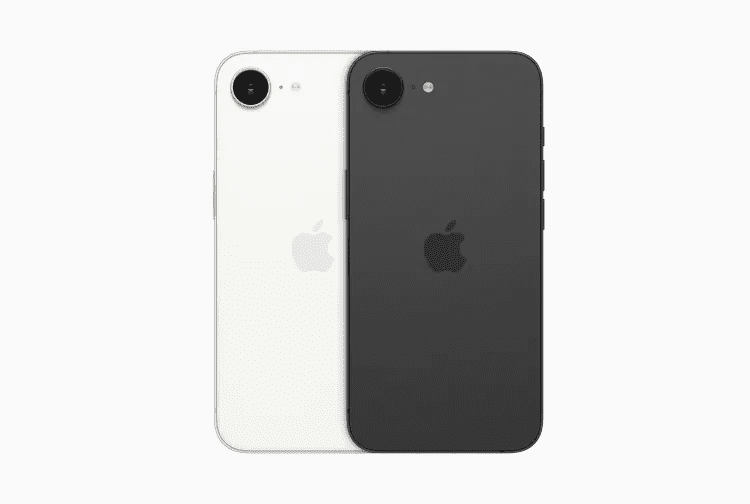
Apple has officially ushered in a new chapter for its budget-friendly smartphone lineup with the launch of the iPhone 16E. This latest release marks the end of an era, as the iconic home button and Touch ID interface have been retired. In their place, the iPhone 16E introduces a sleek, modern design with Face ID, the powerful A18 chip, and support for Apple Intelligence, all starting at an accessible price point of $599.

This device is positioned as a successor to the iPhone SE, blending affordability with cutting-edge features. But is it worth the upgrade? Let’s dive into everything you need to know about the iPhone 16E, from its design and performance to its unique place in Apple’s evolving ecosystem.


A Modern Design with Familiar Roots

The iPhone 16E borrows its design from the 2022 iPhone 14, featuring a 6.06-inch OLED display with a notch for Face ID and front-facing cameras. While it doesn’t adopt the Dynamic Island design found in Apple’s flagship models, the 16E’s display is nearly identical in size to the standard iPhone 16, measuring just 0.1mm narrower and 0.7mm shorter.

This means Apple no longer offers a significantly smaller iPhone, catering to users who prefer compact devices. However, rumors suggest a potential shift with the upcoming iPhone 17 Air, which might reintroduce a smaller form factor.

The iPhone 16E is available in classic white and black color options, maintaining Apple’s signature minimalist aesthetic. It also includes the customizable Action Button, a feature previously reserved for higher-end models, but omits the new Camera Control found in the iPhone 16 series.


Performance That Packs a Punch

Under the hood, the iPhone 16E is powered by the same A18 chip found in the iPhone 16, making it one of the most capable budget smartphones on the market. This chip enables support for Apple Intelligence, Apple’s suite of AI-powered tools, including features like notification summaries and enhanced Siri capabilities.

Interestingly, even the non-Pro iPhone 15 lacks support for Apple Intelligence, giving the 16E a unique edge. To run these advanced features, Apple has confirmed that devices need at least 8GB of RAM, which the 16E likely includes. Additionally, the base model now starts at 128GB of storage, a welcome upgrade from the 64GB option in previous budget models.


Camera and Connectivity: Balancing Act

The iPhone 16E features a single 48-megapixel rear camera, a notable downgrade compared to the multi-camera setups in Apple’s flagship devices. However, it still delivers impressive photo quality for everyday use, ensuring you don’t miss out on capturing life’s moments.

On the connectivity front, the iPhone 16E marks a significant milestone as the first iPhone to include an Apple-developed modem. After years of relying on Qualcomm, Apple has finally introduced its own modem technology. While this is a major step forward, questions remain about its performance and reliability, especially as Apple prepares to expand its use in future models like the iPhone 17.

The device also swaps the Lightning port for USB-C, complying with EU regulations and aligning with Apple’s broader shift toward universal charging standards. However, it lacks support for MagSafe accessories and fast wireless charging, capping wireless charging speeds at 7.5W—a slower pace compared to the 25W charging available on pricier iPhones.


What You’re Giving Up (and What You’re Gaining)
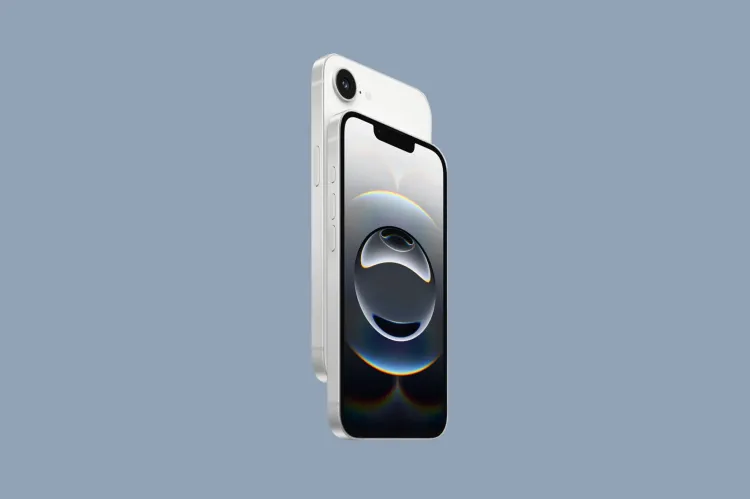
image 110

The iPhone 16E strikes a balance between affordability and modern features, but it does come with some compromises:

  • No Multi-Camera System: The single rear camera may disappoint photography enthusiasts.
  • Limited Wireless Charging: Slower charging speeds compared to flagship models.
  • No Dynamic Island: The notch design feels slightly outdated next to Apple’s latest innovations.

However, the 16E makes up for these shortcomings with:

  • Face ID and Apple Intelligence: Advanced security and AI features previously unavailable in budget models.
  • 128GB Base Storage: Double the storage of its predecessor, the iPhone SE (2022).
  • Water Resistance: An IP rating ensures durability against spills and splashes.

Pricing and Availability

The iPhone 16E is available for preorder starting at $499 of the 2022 iPhone SE. However, the higher cost reflects the device’s modern design, enhanced performance, and additional storage.

The phone officially ships on February 28th, making it an attractive option for users looking to upgrade without breaking the bank.


Why the iPhone 16E Matters
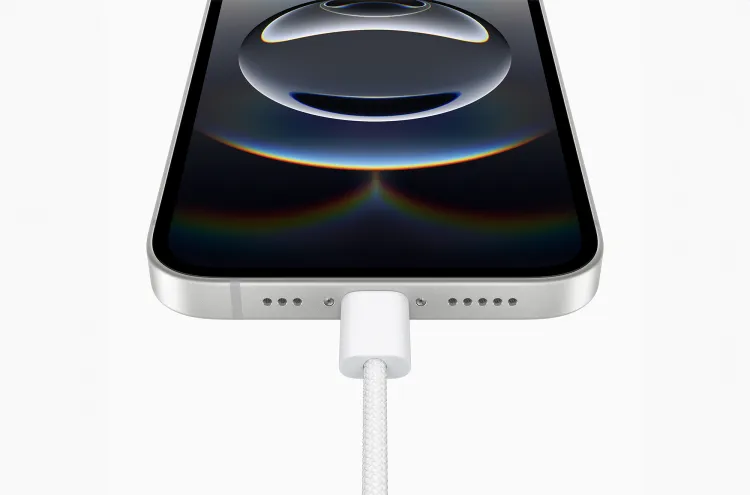
image 111

The iPhone 16E represents a strategic move by Apple to bridge the gap between its budget and flagship models. By incorporating features like Face ID, the A18 chip, and Apple Intelligence, Apple is ensuring that even its more affordable devices remain competitive in a rapidly evolving market.

For consumers, the 16E offers a compelling blend of performance, design, and value, making it an excellent choice for:

  • First-Time iPhone Users: An affordable entry point into the Apple ecosystem.
  • Upgraders: Those looking to modernize without splurging on a Pro model.
  • Tech Enthusiasts: Early adopters curious about Apple’s in-house modem technology.

The iPhone 16E is more than just a budget smartphone—it’s a testament to Apple’s commitment to innovation and accessibility. While it may not have all the bells and whistles of the iPhone 16 Pro, it delivers a powerful, modern experience at a fraction of the cost.

Whether you’re preordering the iPhone 16E or considering it as your next upgrade, this device is a clear sign that Apple is redefining what a budget-friendly iPhone can be.

ADVERTISEMENT
RECOMMENDED
NEXT UP

Apple has quietly rolled out a major update to its App Store experience, officially launching a fully redesigned web-based App Store that allows users to browse and discover apps across all Apple devices from a single online hub. The move, first spotted by MacRumors and 9to5Mac, marks a significant expansion of Apple’s ecosystem — bringing the App Store’s signature design and features to the browser for the first time.

According to the company, it now has a modern, app-store-like interface that looks similar to the App Store on iPhones, iPads, Macs, and other products. The domain was previously used as a holding place that hosted static information about apps or redirected users to in-device App Store pages.

A Centralized Experience Across All Apple Platforms

image 5

The new update allows them to easily search through apps across device categories like iPhone, iPad, Mac, Vision Pro, Apple Watch, and even Apple TV. Each section provides curated app lists, editorial recommendations, and Apple’s popular “Today” tab to show off featured apps, developer spotlights, and trending downloads.

The interface also allows users to browse applications based on their categories, such as Productivity, Entertainment, Games, Education, and Health & Fitness, and provides a much more streamlined and searchable experience than in the past.

Search, Share, and Explore — But Not Download

While this new web-based App Store does introduce better navigation and search, Apple is retaining control over where the downloads actually happen: users cannot install apps directly from the web version of the store. Instead, the website offers quick options to share listings of apps or open them directly in the native App Store app on an Apple device.

This is a design choice in concert with Apple’s long-term ecosystem strategy: making sure all app installations continue to go through its official App Store infrastructure, where the company can enforce strict privacy, payment, and security controls.

Smarter Search Portal for Developers and Users

Another welcome improvement: A prominently placed search bar finally allows users to quickly find apps by name, category, and even developer. Apple’s web app pages were previously static, unindexed, and generally inaccessible unless directly linked to a page.

Now, with an interface that is entirely searchable, this latest Web App Store serves dually as a marketing tool for developers and a place of discovery for users, maximizing app exposure to bring developers’ creations in front of larger audiences outside of Apple’s devices.

Expanding Apple’s Ecosystem Online

Apple’s extension of the App Store’s web presence also comes at a time when regulators and users are increasingly pressing for more openness and accessibility across all digital platforms. In creating this new, more interactive web presence, Apple seems to be taking steps toward greater transparency and discoverability, if still through a tightly integrated ecosystem.

The update also comes amidst Apple’s growing focus on cross-device experiences – especially as it promotes new platforms like Apple Vision Pro, which integrates apps across immersive and traditional interfaces.

Looking Ahead: Apple’s Strategy in a Changing App Landscape

The launch of the web App Store might seem like a minor revision, but it shows that Apple is taking a long-term view to elevate discovery and engagement of apps beyond its hardware. By opening the App Store to any browser, Apple enhances the user experience and reinforces its developer ecosystem by providing greater visibility and traffic to millions of applications without compromising strict app distribution policies. This latest move by Apple strikes a careful balance between innovation, control, and accessibility in a world of rapidly evolving digital ecosystems and increasing regulatory pressures. This is where the App Store, as the linchpin of the Apple experience, is now more connected than ever.

Signal has rolled out a critical privacy-focused update for its Windows app, introducing a “screen security” setting that prevents the system from capturing screenshots—directly countering Microsoft’s controversial Recall feature.

This move reinforces Signal’s commitment to user privacy, ensuring sensitive conversations remain protected even against AI-powered background surveillance. Here’s everything you need to know.


Why Signal Is Blocking Windows Screenshots

Microsoft Recall: A Privacy Concern

Microsoft’s Recall feature (announced in 2023) continuously captures and stores screenshots of user activity, allowing Windows 11 users to “scroll back in time” and revisit past actions.

Despite Microsoft pausing Recall’s rollout after backlash, the company reintroduced it in April 2024 via the Windows Insider Preview Channel with key changes:
✔ Opt-in requirement (users must enable it manually)
✔ Pause functionality (temporary deactivation)

However, Signal argues that Recall still poses risks:
🔴 Potential exposure of sensitive chats (even if encrypted)
🔴 Lack of granular app-level control (Recall captures everything by default)

How Signal’s “Screen Security” Works

When enabled, this setting:
✅ Blocks Windows from screenshotting Signal’s window (shows a blank screen instead)
✅ Prevents Recall from storing private conversations
✅ Maintains end-to-end encryption integrity

⚠ Trade-off: Some accessibility tools (like screen readers) may not function properly with this setting active.


How to Enable (or Disable) Signal’s Screen Security

Step-by-Step Guide

  1. Open Signal Desktop
  2. Go to Settings > Privacy > Screen Security
  3. Toggle “Block screenshots” (enabled by default)

🔹 Disabling the feature requires confirmation (to prevent accidental deactivation).
🔹 A warning appears reminding users of potential privacy risks.


Signal’s Critique of Microsoft’s Approach

In a blog post, Signal expressed frustration with the need for such workarounds:

“We hope that AI teams building systems like Recall will consider these implications more carefully. Apps like Signal shouldn’t need a ‘one weird trick’ to protect user privacy—developers deserve better tools.”

Key Issues with Recall

🔸 No API for apps to opt out (forcing manual workarounds like Signal’s)
🔸 Potential security vulnerabilities (stored screenshots could be accessed by malware)
🔸 Privacy vs. convenience imbalance (users may not fully understand the risks)


What This Means for Windows Users

image 25

✔ Signal users gain stronger privacy protection against Recall.
✔ Other encrypted apps (like WhatsApp, Telegram) may follow suit.
✔ Microsoft faces continued scrutiny over AI-powered surveillance features.

Should You Disable Recall Entirely?

If privacy is a priority:

  1. Avoid enabling Recall (if using Windows Insider builds).
  2. Use Signal’s screen security for encrypted chats.
  3. Monitor future Windows updates for improved privacy controls.

Final Verdict: A Necessary Move for Privacy

Signal’s update highlights the growing tension between AI convenience and user privacy. While Microsoft positions Recall as a productivity tool, its always-on screenshotting raises legitimate security concerns.

By proactively blocking Recall, Signal sets a precedent—tech companies must prioritize privacy by design, not as an afterthought.

ADVERTISEMENT
Receive the latest news

Subscribe To Our Weekly Newsletter

Get notified about new articles