Techfullpost

Google Play Introduces Verification Badges for VPN Apps: What You Need to Know

Google Play/techfullnews

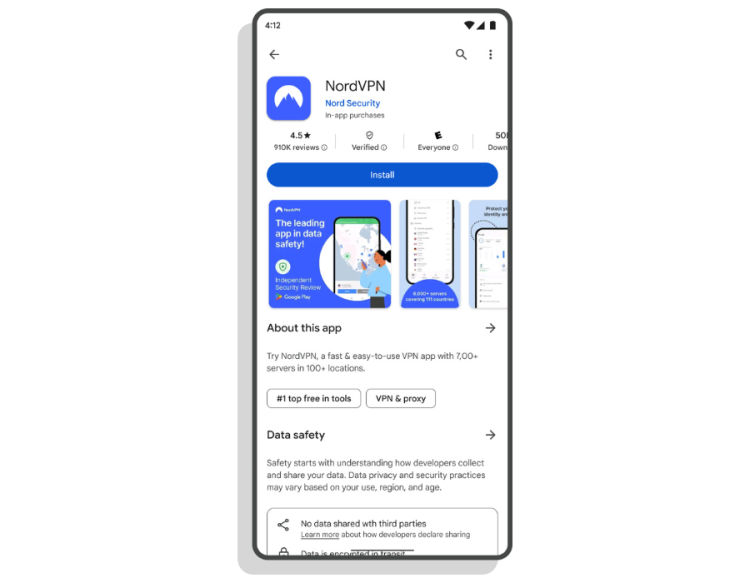
In a move to enhance user trust and safety, Google has announced a new verification badge for VPN apps on the Google Play Store. Starting now, approved VPN apps will display a badge on their details page and in search results, signaling that they meet Google’s stringent privacy and security standards. This update is part of Google’s ongoing efforts to promote transparency and protect users from potentially unsafe apps.

With the growing popularity of VPNs—especially as users seek ways to access restricted content like TikTok—this verification system aims to help users identify trustworthy apps. Let’s explore what this means for VPN providers, how the verification process works, and why it matters for users.

What is the Google Play VPN Verification Badge?

The verification badge is a new feature designed to highlight VPN apps that prioritize user privacy and security. Apps that earn this badge have undergone a rigorous evaluation process to ensure they meet Google’s standards. The badge appears in two places:

App Details Page: A visible indicator on the app’s listing page.

Search Results: A badge next to the app’s name in search results, making it easier for users to identify verified VPNs.

This initiative builds on Google’s previous efforts, such as privacy labels and independent security review badges, to create a safer app ecosystem.

How Do VPN Apps Qualify for the Verification Badge?


To earn the verification badge, VPN apps must meet several criteria:

Mobile Application Security Assessment (MASA) Level 2 Validation: Apps must pass this security assessment, which evaluates their code, data handling practices, and overall security posture.

Minimum Install and Review Thresholds: Apps must have at least 10,000 installs and 250 reviews to demonstrate user trust and engagement.

App Store Presence: Apps must have been published on Google Play for at least 90 days.

Data Collection Transparency: Developers must provide detailed information about how they collect, use, and protect user data.

Independent Security Reviews: Apps must opt in to third-party security reviews to ensure ongoing compliance with best practices.

While these are the primary requirements, Google notes that other factors may also influence the evaluation process.

Why This Update Matters


The introduction of verification badges comes at a critical time. VPN usage has surged as users seek to bypass geo-restrictions, access blocked content, and protect their online privacy. However, not all VPNs are created equal—some may compromise user data or fail to provide adequate security.

By highlighting verified VPNs, Google aims to:

Boost User Confidence: Help users identify apps that meet high security and privacy standards.

Combat Malicious Apps: Reduce the prevalence of unsafe or fraudulent VPNs on the Play Store.

Promote Transparency: Encourage developers to adopt best practices for data handling and security.

Which VPNs Have Been Verified So Far?
Several popular VPN providers have already received the verification badge, including:

NordVPN

hide.me

Aloha VPN

These apps have demonstrated their commitment to user privacy and security, setting a benchmark for other VPN providers.

How Users Can Benefit from Verified VPNs

For users, the verification badge serves as a quick and reliable way to assess a VPN app’s credibility. Here’s how you can make the most of this new feature:

Look for the Badge: When searching for a VPN, check for the verification badge on the app’s details page or in search results.

Read Reviews: Even with the badge, it’s a good idea to read user reviews and ratings to gauge the app’s performance and reliability.

Understand Data Practices: Verified VPNs are required to disclose their data collection practices, so take the time to review this information before downloading.

Google’s Broader Efforts to Enhance App Security

The verification badge is the latest in a series of initiatives by Google to improve app security and transparency. Previous efforts include:

Privacy Labels (2022): Introduced to provide users with clear information about how apps handle their data.

Independent Security Review Badge: Highlighted apps that underwent third-party security assessments.

These measures reflect Google’s commitment to creating a safer and more trustworthy app ecosystem.

What This Means for VPN Developers

For VPN developers, earning the verification badge is a mark of credibility and trustworthiness. However, it also requires a commitment to maintaining high security and privacy standards. Developers should:

Invest in Security: Regularly update their apps to address vulnerabilities and comply with industry best practices.

Be Transparent: Clearly communicate their data collection and usage policies to users.

Engage with Users: Encourage reviews and feedback to build trust and improve their app’s reputation.

Google Play’s new verification badge for VPN apps is a significant step toward enhancing user safety and trust in the app ecosystem. By highlighting apps that meet rigorous security and privacy standards, Google is helping users make informed decisions while encouraging developers to prioritize user protection.

As VPN usage continues to grow, this initiative provides much-needed clarity in a crowded and often confusing market. Whether you’re a user looking for a reliable VPN or a developer aiming to build trust, the verification badge is a valuable tool for navigating the digital landscape.


ADVERTISEMENT
RECOMMENDED
NEXT UP

Signal has rolled out a critical privacy-focused update for its Windows app, introducing a “screen security” setting that prevents the system from capturing screenshots—directly countering Microsoft’s controversial Recall feature.

This move reinforces Signal’s commitment to user privacy, ensuring sensitive conversations remain protected even against AI-powered background surveillance. Here’s everything you need to know.


Why Signal Is Blocking Windows Screenshots

Microsoft Recall: A Privacy Concern

Microsoft’s Recall feature (announced in 2023) continuously captures and stores screenshots of user activity, allowing Windows 11 users to “scroll back in time” and revisit past actions.

Despite Microsoft pausing Recall’s rollout after backlash, the company reintroduced it in April 2024 via the Windows Insider Preview Channel with key changes:
✔ Opt-in requirement (users must enable it manually)
✔ Pause functionality (temporary deactivation)

However, Signal argues that Recall still poses risks:
🔴 Potential exposure of sensitive chats (even if encrypted)
🔴 Lack of granular app-level control (Recall captures everything by default)

How Signal’s “Screen Security” Works

When enabled, this setting:
✅ Blocks Windows from screenshotting Signal’s window (shows a blank screen instead)
✅ Prevents Recall from storing private conversations
✅ Maintains end-to-end encryption integrity

⚠ Trade-off: Some accessibility tools (like screen readers) may not function properly with this setting active.


How to Enable (or Disable) Signal’s Screen Security

Step-by-Step Guide

  1. Open Signal Desktop
  2. Go to Settings > Privacy > Screen Security
  3. Toggle “Block screenshots” (enabled by default)

🔹 Disabling the feature requires confirmation (to prevent accidental deactivation).
🔹 A warning appears reminding users of potential privacy risks.


Signal’s Critique of Microsoft’s Approach

In a blog post, Signal expressed frustration with the need for such workarounds:

“We hope that AI teams building systems like Recall will consider these implications more carefully. Apps like Signal shouldn’t need a ‘one weird trick’ to protect user privacy—developers deserve better tools.”

Key Issues with Recall

🔸 No API for apps to opt out (forcing manual workarounds like Signal’s)
🔸 Potential security vulnerabilities (stored screenshots could be accessed by malware)
🔸 Privacy vs. convenience imbalance (users may not fully understand the risks)


What This Means for Windows Users

✔ Signal users gain stronger privacy protection against Recall.
✔ Other encrypted apps (like WhatsApp, Telegram) may follow suit.
✔ Microsoft faces continued scrutiny over AI-powered surveillance features.

Should You Disable Recall Entirely?

If privacy is a priority:

  1. Avoid enabling Recall (if using Windows Insider builds).
  2. Use Signal’s screen security for encrypted chats.
  3. Monitor future Windows updates for improved privacy controls.

Final Verdict: A Necessary Move for Privacy

Signal’s update highlights the growing tension between AI convenience and user privacy. While Microsoft positions Recall as a productivity tool, its always-on screenshotting raises legitimate security concerns.

By proactively blocking Recall, Signal sets a precedent—tech companies must prioritize privacy by design, not as an afterthought.

Saudi Crown Prince Mohammed bin Salman has made a strategic leap into artificial intelligence with the launch of Humain, a state-backed AI company poised to transform the Kingdom’s technological capabilities. This ambitious venture represents more than just another tech startup—it’s a cornerstone of Saudi Arabia’s Vision 2030 plan to diversify its oil-dependent economy and establish itself as a global AI leader.

Inside the Humain Initiative

Infrastructure Development

  • Massive data center construction across strategic Saudi locations
  • Cloud computing capabilities to rival global hyperscalers
  • AI research facilities with cutting-edge hardware

Financial Backing

  • Funded by Saudi Arabia’s $940 billion Public Investment Fund (PIF)
  • Part of broader $40 billion AI investment plan announced earlier this year
  • Positions Saudi Arabia as the world’s largest AI investor

The Geopolitical Context

High-Profile AI Summit Coincidence

The Humain launch coincides with a major U.S.-Saudi investment forum attracting tech titans:

  • Elon Musk (Tesla, xAI, SpaceX)
  • Sam Altman (OpenAI)
  • Mark Zuckerberg (Meta)
  • President Trump’s scheduled visit to the region

Strategic Partnerships

American tech giants are already engaging with Saudi’s AI ambitions:

  • Google’s cloud partnership with Saudi Aramco
  • Salesforce’s Middle East expansion
  • Microsoft’s $2.1 billion Saudi cloud investment

Why This Matters for Global Tech

1. Shifting AI Power Centers

Saudi Arabia’s move challenges traditional tech hubs, offering:

  • Alternative funding sources beyond Silicon Valley VCs
  • Geopolitical neutrality in US-China tech tensions
  • Energy advantages for power-intensive AI operations

2. Economic Transformation

The PIF’s strategy mirrors successful sovereign wealth plays:

  • SoftBank Vision Fund model at national scale
  • Norway’s oil fund approach applied to tech
  • Singapore’s Temasek -style strategic investing

3. Technology Sovereignty

Humain addresses critical national priorities:

  • Reducing dependence on foreign tech
  • Creating high-value domestic jobs
  • Securing data localization compliance

Challenges and Considerations

Potential Roadblocks

  • Talent acquisition in competitive global market
  • Cultural adaptation for international tech workers
  • Regulatory environment for AI development

Ethical Questions

  • AI governance in authoritarian context
  • Surveillance technology concerns
  • Content moderation approaches

What’s Next for Humain?

Industry analysts predict several likely developments:

  1. Major university partnerships for AI research
  2. Acquisition of niche AI startups
  3. Joint ventures with established tech firms
  4. Saudi-specific AI applications for:
    • Arabic language processing
    • Islamic finance technology
    • Smart city implementations

The Bigger Picture

This move positions Saudi Arabia at the center of three converging trends:

  1. The AI arms race among nations
  2. The petrodollar to tech-dollar transition
  3. Middle East’s emergence as a tech hub

With Humain, MBS isn’t just investing in AI—he’s attempting to future-proof Saudi Arabia’s economy and influence in what may become the most strategically important technology sector of the 21st century.

ADVERTISEMENT
Receive the latest news

Subscribe To Our Weekly Newsletter

Get notified about new articles