Techfullpost

5 BEST WALLPAPER APPS FOR YOUR IPHONE

Iphone/techfullnews

There are numerous ways to personalize your iPhone, whether it’s by adding widgets to your lock screen, assigning custom ringtones for different contacts, or using unique icons on your home screen. But the easiest and quickest way to give your phone a fresh appearance is by changing your wallpaper. While the iPhone comes with a good variety of default wallpapers—some of which change color based on the time of day—you have even more options to explore. Best wallpaper apps

You can use any photo from your gallery as your wallpaper. However, while some people take beautiful photos themselves, many of us prefer to look for wallpapers elsewhere. You might use Pinterest or find images on Google, but these pictures often aren’t optimized for your phone’s resolution, leading to blurry or cropped results.

This is where third-party apps come in handy. The App Store offers a variety of wallpaper apps designed specifically for high-quality images that fit your iPhone. Below is a list of five great wallpaper apps for iPhone, each with unique features to enhance your phone’s look.

Unsplash
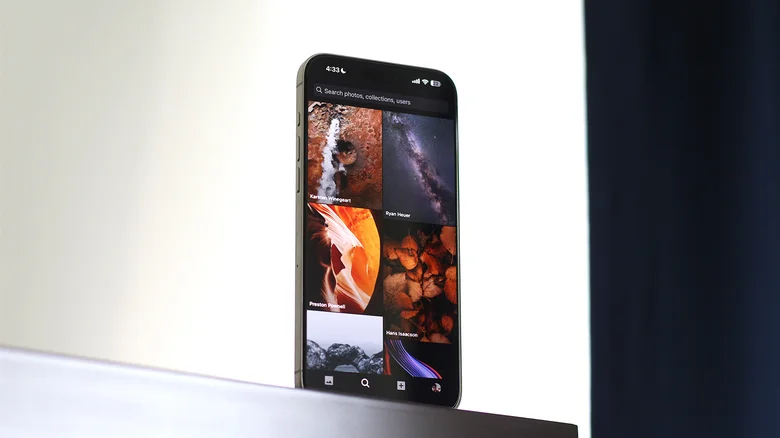
With a library of over six million photos, Unsplash is a top destination for high-resolution images perfect for wallpapers. The app’s simple interface makes it easy to find what you’re looking for without hassle. You can search by category or browse the “Discover” feed, which highlights trending images. If you want to know more about an image, you can tap the info icon to see details like camera type and image resolution.

Though you don’t need an account to use Unsplash, creating one allows you to make collections, sync them across devices, and share them with others. The platform also has user-curated collections, including ones specifically for iPhone wallpapers.

While not all images will match your iPhone’s screen ratio, you can easily crop high-quality images to fit. Unsplash also lets you upload your own photos, which others can download. Despite its extensive selection, the app is free and doesn’t have any intrusive ads, making it a great option for finding premium wallpapers.

Wallcraft
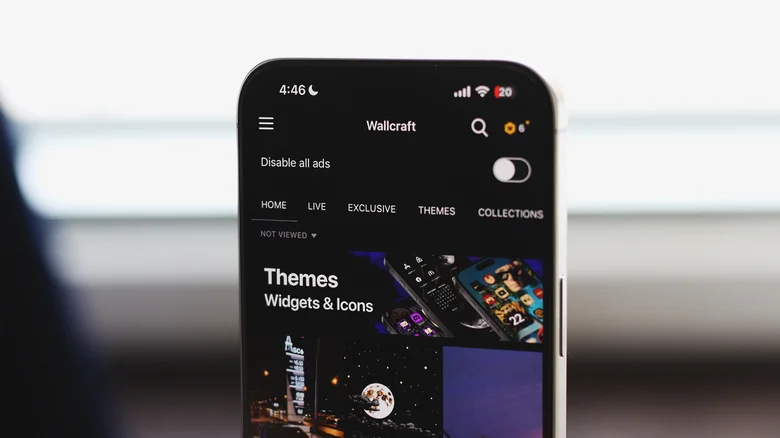
Another excellent option is Wallcraft, which has earned a solid 4.6-star rating on the App Store. This app offers wallpapers in various categories, such as abstract, anime, cars, and space. These are easily accessible from the menu, allowing for simple navigation.

Like Unsplash, Wallcraft allows you to create an account to upload your images and access your downloaded wallpapers. The app also provides live wallpapers for iPhone 6s and newer, which animate briefly when you wake your phone’s screen.

To access premium wallpapers—such as live, double, and exclusive options—Wallcraft offers a subscription for $4.99 per year or a one-time purchase of $12.99, both of which remove ads. Alternatively, you can watch ads to earn credits to unlock specific wallpapers. Even without the premium subscription, Wallcraft’s extensive library makes it a strong choice for wallpaper fans.

Zedge
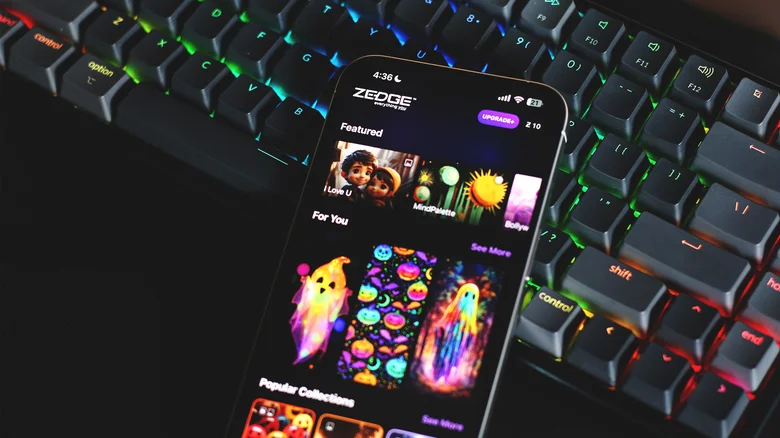
Zedge is a well-known app for phone customization, offering not only wallpapers but also ringtones and notification sounds. It maintains a 4.4-star rating on the App Store and allows users to search for wallpapers by category or color. This feature makes it easy to find images that match your phone’s theme.

Zedge also features a home screen widget, so you can change your wallpaper frequently without opening the app. Plus, Zedge offers Apple Watch faces and has an AI tool that lets users generate custom wallpapers.

While Zedge charges $4.99 per month for its subscription, users can opt for a lifetime premium option for $19.99. This price includes access to a variety of features beyond wallpapers. However, you can still use Zedge for free without ever needing to upgrade, making it a popular choice for many users.

Vellum Wallpapers
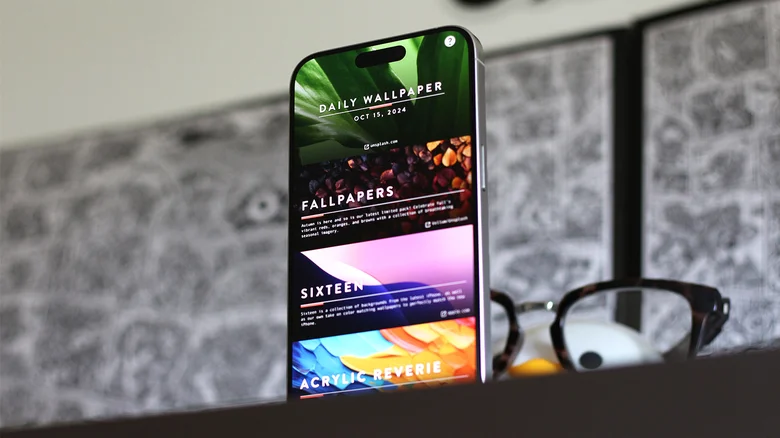
Vellum stands out with its minimalist design and unique interface. Instead of a profile or navigation menu, Vellum organizes wallpapers into curated collections, making it easy to browse through them quickly.

When you select a wallpaper, the app gives you a preview of how it will look on both your lock screen and home screen, so you can see how it will interact with other elements like widgets and app icons. Vellum also offers a blur tool, allowing you to soften the background while still seeing your apps clearly.

Vellum’s premium version costs $2.99, which removes ads. However, all wallpaper collections are available for free, making the app a great choice for discovering beautiful, unique wallpapers.

Backdrops

Lastly, Backdrops is a favorite for many and offers an excellent user experience. It has a regularly updated “Explore” section, showcasing high-quality wallpapers handpicked by the developers. The app also features a “Community” tab where you can find more user-generated content.

Backdrops doesn’t require an account, but logging in allows you to favorite wallpapers and organize them in one place. The app’s clean interface and curated selection make it easy to find the perfect wallpaper that suits your iPhone’s aspect ratio.

For $3.99, you can remove ads and unlock the Pro collection. The free version, however, offers a wide variety of wallpapers that should be enough to refresh your phone’s look.

Choosing the Right Wallpaper App

These five apps were chosen based on their popularity, user reviews, and firsthand testing. Whether you want an extensive library like Unsplash or a carefully curated collection like Vellum, each app provides high-quality wallpapers for iPhone users.

While some apps, like Wallcraft and Zedge, rely on ads, they also offer large collections for free. Meanwhile, apps like Vellum and Backdrops offer a more streamlined experience with well-designed wallpapers that perfectly fit your iPhone. Whatever your preference, these apps will help you give your iPhone a fresh, new look.


ADVERTISEMENT
RECOMMENDED
NEXT UP

Signal has rolled out a critical privacy-focused update for its Windows app, introducing a “screen security” setting that prevents the system from capturing screenshots—directly countering Microsoft’s controversial Recall feature.

This move reinforces Signal’s commitment to user privacy, ensuring sensitive conversations remain protected even against AI-powered background surveillance. Here’s everything you need to know.


Why Signal Is Blocking Windows Screenshots

Microsoft Recall: A Privacy Concern

Microsoft’s Recall feature (announced in 2023) continuously captures and stores screenshots of user activity, allowing Windows 11 users to “scroll back in time” and revisit past actions.

Despite Microsoft pausing Recall’s rollout after backlash, the company reintroduced it in April 2024 via the Windows Insider Preview Channel with key changes:
✔ Opt-in requirement (users must enable it manually)
✔ Pause functionality (temporary deactivation)

However, Signal argues that Recall still poses risks:
🔴 Potential exposure of sensitive chats (even if encrypted)
🔴 Lack of granular app-level control (Recall captures everything by default)

How Signal’s “Screen Security” Works

When enabled, this setting:
✅ Blocks Windows from screenshotting Signal’s window (shows a blank screen instead)
✅ Prevents Recall from storing private conversations
✅ Maintains end-to-end encryption integrity

⚠ Trade-off: Some accessibility tools (like screen readers) may not function properly with this setting active.


How to Enable (or Disable) Signal’s Screen Security

Step-by-Step Guide

  1. Open Signal Desktop
  2. Go to Settings > Privacy > Screen Security
  3. Toggle “Block screenshots” (enabled by default)

🔹 Disabling the feature requires confirmation (to prevent accidental deactivation).
🔹 A warning appears reminding users of potential privacy risks.


Signal’s Critique of Microsoft’s Approach

In a blog post, Signal expressed frustration with the need for such workarounds:

“We hope that AI teams building systems like Recall will consider these implications more carefully. Apps like Signal shouldn’t need a ‘one weird trick’ to protect user privacy—developers deserve better tools.”

Key Issues with Recall

🔸 No API for apps to opt out (forcing manual workarounds like Signal’s)
🔸 Potential security vulnerabilities (stored screenshots could be accessed by malware)
🔸 Privacy vs. convenience imbalance (users may not fully understand the risks)


What This Means for Windows Users

✔ Signal users gain stronger privacy protection against Recall.
✔ Other encrypted apps (like WhatsApp, Telegram) may follow suit.
✔ Microsoft faces continued scrutiny over AI-powered surveillance features.

Should You Disable Recall Entirely?

If privacy is a priority:

  1. Avoid enabling Recall (if using Windows Insider builds).
  2. Use Signal’s screen security for encrypted chats.
  3. Monitor future Windows updates for improved privacy controls.

Final Verdict: A Necessary Move for Privacy

Signal’s update highlights the growing tension between AI convenience and user privacy. While Microsoft positions Recall as a productivity tool, its always-on screenshotting raises legitimate security concerns.

By proactively blocking Recall, Signal sets a precedent—tech companies must prioritize privacy by design, not as an afterthought.

Saudi Crown Prince Mohammed bin Salman has made a strategic leap into artificial intelligence with the launch of Humain, a state-backed AI company poised to transform the Kingdom’s technological capabilities. This ambitious venture represents more than just another tech startup—it’s a cornerstone of Saudi Arabia’s Vision 2030 plan to diversify its oil-dependent economy and establish itself as a global AI leader.

Inside the Humain Initiative

Infrastructure Development

  • Massive data center construction across strategic Saudi locations
  • Cloud computing capabilities to rival global hyperscalers
  • AI research facilities with cutting-edge hardware

Financial Backing

  • Funded by Saudi Arabia’s $940 billion Public Investment Fund (PIF)
  • Part of broader $40 billion AI investment plan announced earlier this year
  • Positions Saudi Arabia as the world’s largest AI investor

The Geopolitical Context

High-Profile AI Summit Coincidence

The Humain launch coincides with a major U.S.-Saudi investment forum attracting tech titans:

  • Elon Musk (Tesla, xAI, SpaceX)
  • Sam Altman (OpenAI)
  • Mark Zuckerberg (Meta)
  • President Trump’s scheduled visit to the region

Strategic Partnerships

American tech giants are already engaging with Saudi’s AI ambitions:

  • Google’s cloud partnership with Saudi Aramco
  • Salesforce’s Middle East expansion
  • Microsoft’s $2.1 billion Saudi cloud investment

Why This Matters for Global Tech

1. Shifting AI Power Centers

Saudi Arabia’s move challenges traditional tech hubs, offering:

  • Alternative funding sources beyond Silicon Valley VCs
  • Geopolitical neutrality in US-China tech tensions
  • Energy advantages for power-intensive AI operations

2. Economic Transformation

The PIF’s strategy mirrors successful sovereign wealth plays:

  • SoftBank Vision Fund model at national scale
  • Norway’s oil fund approach applied to tech
  • Singapore’s Temasek -style strategic investing

3. Technology Sovereignty

Humain addresses critical national priorities:

  • Reducing dependence on foreign tech
  • Creating high-value domestic jobs
  • Securing data localization compliance

Challenges and Considerations

Potential Roadblocks

  • Talent acquisition in competitive global market
  • Cultural adaptation for international tech workers
  • Regulatory environment for AI development

Ethical Questions

  • AI governance in authoritarian context
  • Surveillance technology concerns
  • Content moderation approaches

What’s Next for Humain?

Industry analysts predict several likely developments:

  1. Major university partnerships for AI research
  2. Acquisition of niche AI startups
  3. Joint ventures with established tech firms
  4. Saudi-specific AI applications for:
    • Arabic language processing
    • Islamic finance technology
    • Smart city implementations

The Bigger Picture

This move positions Saudi Arabia at the center of three converging trends:

  1. The AI arms race among nations
  2. The petrodollar to tech-dollar transition
  3. Middle East’s emergence as a tech hub

With Humain, MBS isn’t just investing in AI—he’s attempting to future-proof Saudi Arabia’s economy and influence in what may become the most strategically important technology sector of the 21st century.

ADVERTISEMENT
Receive the latest news

Subscribe To Our Weekly Newsletter

Get notified about new articles