

Techfullpost

Android Auto 10.5: What to Know Before Downloading

Android Auto 10.5

Android Auto is a Google app that lets you control your phone while you’re driving. It shows you a simplified interface on your car’s display, so you can focus on the road.

Android Auto 10.5 is the latest beta version of Android Auto. It’s still under development, so it may contain bugs.

Here’s what you need to know before downloading Android Auto 10.5 beta:

  • It’s only available for beta testers. To download Android Auto 10.5 beta, you need to be enrolled in the Android Auto beta program. You can sign up for the beta program on the Google website.
  • It may contain bugs. Beta software is still under development, so it may contain bugs. If you encounter any bugs, please report them to Google so they can be fixed.
  • It’s not as stable as the stable release. The stable release of Android Auto is the most stable version of the app. It’s less likely to contain bugs and performance problems.

Should you download Android Auto 10.5 beta?
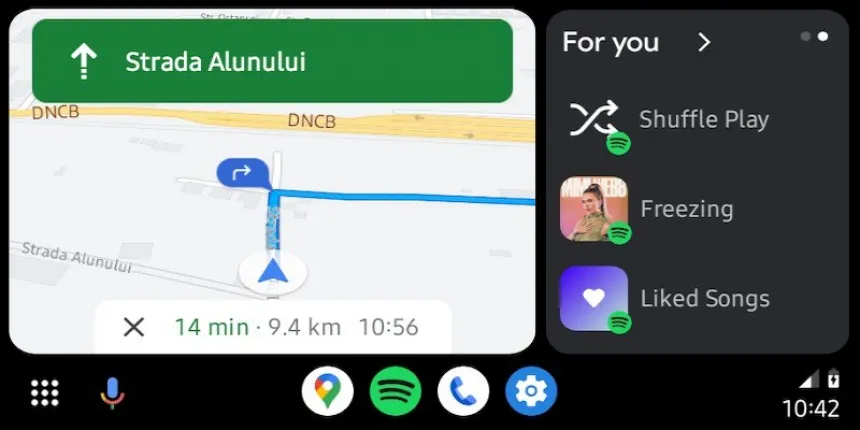
image 129

If you’re a power user who wants to try out the latest features and improvements to Android Auto, then you should consider downloading the beta. However, if you rely on Android Auto for your daily driving, then you should wait for the stable release.

How to download Android Auto 10.5 beta

To download Android Auto 10.5 beta, you need to be enrolled in the Android Auto beta program. Once you’re enrolled, you can download the beta app from the Google Play Store.

How to sideload Android Auto 10.5 beta

If you’re not enrolled in the Android Auto beta program, you can still download and install Android Auto 10.5 beta by sideloading the APK file.
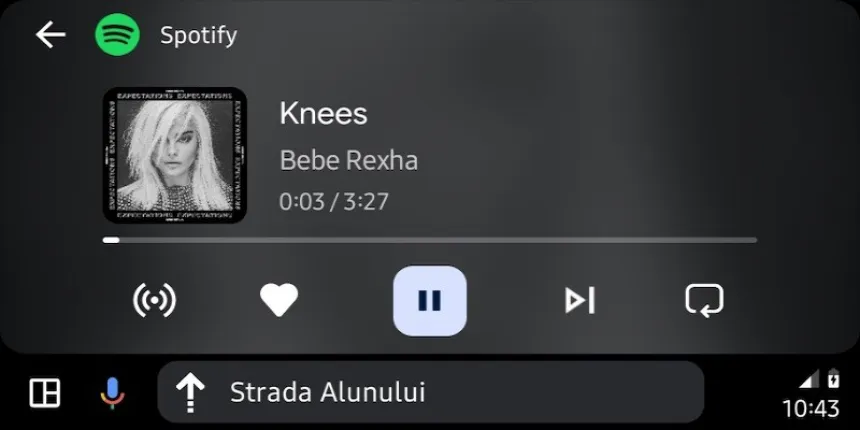
image 130

To sideload Android Auto 10.5 beta:

  1. Download the Android Auto 10.5 beta APK file from a trusted source.
  2. Open the Settings app on your phone.
  3. Tap Apps & notifications > Advanced > Special app access > Install unknown apps.
  4. Select the file manager app that you’re using to download the APK file.
  5. Toggle on Allow from this source.
  6. Open the file manager app and navigate to the Android Auto 10.5 beta APK file.
  7. Tap the APK file to install it.

How to report bugs in Android Auto 10.5 beta.
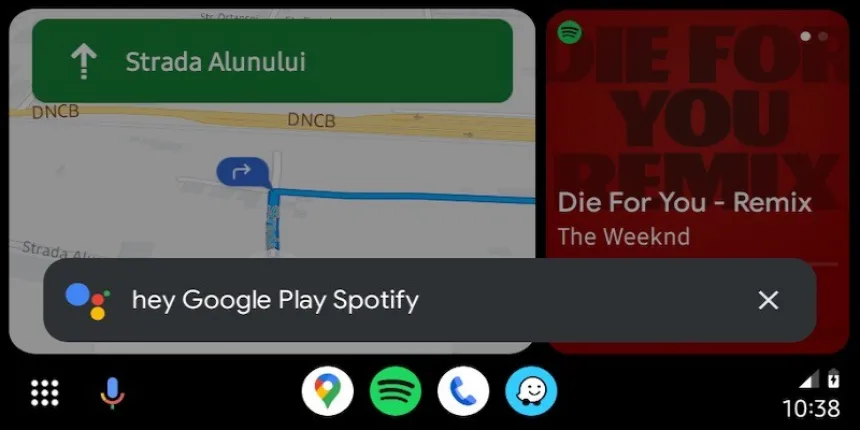
image 131

If you encounter any bugs in Android Auto 10.5 beta, you can report them to Google using the following steps:

  1. Open the Android Auto app.
  2. Tap the three dots in the top right corner.
  3. Tap Help & feedback > Send feedback.
  4. Describe the bug you’re encountering.
  5. Tap Send.

When will Android Auto 10.5 be released in stable channel?

Google has not announced a release date for Android Auto 10.5 in stable channel. However, it is expected to be released within a few weeks of the beta release.

ADVERTISEMENT
RECOMMENDED
NEXT UP

Apple has quietly rolled out a major update to its App Store experience, officially launching a fully redesigned web-based App Store that allows users to browse and discover apps across all Apple devices from a single online hub. The move, first spotted by MacRumors and 9to5Mac, marks a significant expansion of Apple’s ecosystem — bringing the App Store’s signature design and features to the browser for the first time.

According to the company, it now has a modern, app-store-like interface that looks similar to the App Store on iPhones, iPads, Macs, and other products. The domain was previously used as a holding place that hosted static information about apps or redirected users to in-device App Store pages.

A Centralized Experience Across All Apple Platforms

image 5

The new update allows them to easily search through apps across device categories like iPhone, iPad, Mac, Vision Pro, Apple Watch, and even Apple TV. Each section provides curated app lists, editorial recommendations, and Apple’s popular “Today” tab to show off featured apps, developer spotlights, and trending downloads.

The interface also allows users to browse applications based on their categories, such as Productivity, Entertainment, Games, Education, and Health & Fitness, and provides a much more streamlined and searchable experience than in the past.

Search, Share, and Explore — But Not Download

While this new web-based App Store does introduce better navigation and search, Apple is retaining control over where the downloads actually happen: users cannot install apps directly from the web version of the store. Instead, the website offers quick options to share listings of apps or open them directly in the native App Store app on an Apple device.

This is a design choice in concert with Apple’s long-term ecosystem strategy: making sure all app installations continue to go through its official App Store infrastructure, where the company can enforce strict privacy, payment, and security controls.

Smarter Search Portal for Developers and Users

Another welcome improvement: A prominently placed search bar finally allows users to quickly find apps by name, category, and even developer. Apple’s web app pages were previously static, unindexed, and generally inaccessible unless directly linked to a page.

Now, with an interface that is entirely searchable, this latest Web App Store serves dually as a marketing tool for developers and a place of discovery for users, maximizing app exposure to bring developers’ creations in front of larger audiences outside of Apple’s devices.

Expanding Apple’s Ecosystem Online

Apple’s extension of the App Store’s web presence also comes at a time when regulators and users are increasingly pressing for more openness and accessibility across all digital platforms. In creating this new, more interactive web presence, Apple seems to be taking steps toward greater transparency and discoverability, if still through a tightly integrated ecosystem.

The update also comes amidst Apple’s growing focus on cross-device experiences – especially as it promotes new platforms like Apple Vision Pro, which integrates apps across immersive and traditional interfaces.

Looking Ahead: Apple’s Strategy in a Changing App Landscape

The launch of the web App Store might seem like a minor revision, but it shows that Apple is taking a long-term view to elevate discovery and engagement of apps beyond its hardware. By opening the App Store to any browser, Apple enhances the user experience and reinforces its developer ecosystem by providing greater visibility and traffic to millions of applications without compromising strict app distribution policies. This latest move by Apple strikes a careful balance between innovation, control, and accessibility in a world of rapidly evolving digital ecosystems and increasing regulatory pressures. This is where the App Store, as the linchpin of the Apple experience, is now more connected than ever.

Signal has rolled out a critical privacy-focused update for its Windows app, introducing a “screen security” setting that prevents the system from capturing screenshots—directly countering Microsoft’s controversial Recall feature.

This move reinforces Signal’s commitment to user privacy, ensuring sensitive conversations remain protected even against AI-powered background surveillance. Here’s everything you need to know.


Why Signal Is Blocking Windows Screenshots

Microsoft Recall: A Privacy Concern

Microsoft’s Recall feature (announced in 2023) continuously captures and stores screenshots of user activity, allowing Windows 11 users to “scroll back in time” and revisit past actions.

Despite Microsoft pausing Recall’s rollout after backlash, the company reintroduced it in April 2024 via the Windows Insider Preview Channel with key changes:
✔ Opt-in requirement (users must enable it manually)
✔ Pause functionality (temporary deactivation)

However, Signal argues that Recall still poses risks:
🔴 Potential exposure of sensitive chats (even if encrypted)
🔴 Lack of granular app-level control (Recall captures everything by default)

How Signal’s “Screen Security” Works

When enabled, this setting:
✅ Blocks Windows from screenshotting Signal’s window (shows a blank screen instead)
✅ Prevents Recall from storing private conversations
✅ Maintains end-to-end encryption integrity

⚠ Trade-off: Some accessibility tools (like screen readers) may not function properly with this setting active.


How to Enable (or Disable) Signal’s Screen Security

Step-by-Step Guide

  1. Open Signal Desktop
  2. Go to Settings > Privacy > Screen Security
  3. Toggle “Block screenshots” (enabled by default)

🔹 Disabling the feature requires confirmation (to prevent accidental deactivation).
🔹 A warning appears reminding users of potential privacy risks.


Signal’s Critique of Microsoft’s Approach

In a blog post, Signal expressed frustration with the need for such workarounds:

“We hope that AI teams building systems like Recall will consider these implications more carefully. Apps like Signal shouldn’t need a ‘one weird trick’ to protect user privacy—developers deserve better tools.”

Key Issues with Recall

🔸 No API for apps to opt out (forcing manual workarounds like Signal’s)
🔸 Potential security vulnerabilities (stored screenshots could be accessed by malware)
🔸 Privacy vs. convenience imbalance (users may not fully understand the risks)


What This Means for Windows Users

image 25

✔ Signal users gain stronger privacy protection against Recall.
✔ Other encrypted apps (like WhatsApp, Telegram) may follow suit.
✔ Microsoft faces continued scrutiny over AI-powered surveillance features.

Should You Disable Recall Entirely?

If privacy is a priority:

  1. Avoid enabling Recall (if using Windows Insider builds).
  2. Use Signal’s screen security for encrypted chats.
  3. Monitor future Windows updates for improved privacy controls.

Final Verdict: A Necessary Move for Privacy

Signal’s update highlights the growing tension between AI convenience and user privacy. While Microsoft positions Recall as a productivity tool, its always-on screenshotting raises legitimate security concerns.

By proactively blocking Recall, Signal sets a precedent—tech companies must prioritize privacy by design, not as an afterthought.

ADVERTISEMENT
Receive the latest news

Subscribe To Our Weekly Newsletter

Get notified about new articles