Techfullpost

The Hidden Features of Your Tape Measure

The Hidden Features of Your Tape Measure

When it comes to measuring tools, the humble tape measure is a staple in every toolbox. While most of us are familiar with the basic markings and numbers, there are several hidden features on a tape measure that can make your DIY projects easier, faster, and more accurate. Whether you’re a seasoned professional or a weekend warrior, understanding these often-overlooked functions can elevate your measuring game. Let’s dive into the lesser-known features of a tape measure and how they can help you work smarter, not harder.


The Hook Slot: Your Secret Weapon for Solo Measuring

One of the most underrated features of a tape measure is the small hole or slot at the end of the metal hook. This seemingly simple design element is a game-changer for anyone working alone. Here’s how it works:

  • What It’s For: The hole, often called a hook slot, allows you to anchor the tape measure onto a nail or screw that’s partially driven into a surface. This eliminates the need for a second person to hold the other end of the tape, making it ideal for solo projects.
  • How to Use It: Simply hook the slot onto a nail or screw, pull the tape to your desired length, and take your measurement. It’s a straightforward yet invaluable feature for tasks like measuring large distances or marking layouts on walls.

This feature is especially useful for carpenters, decorators, and DIY enthusiasts who often work alone. It’s a small detail that can save you time and frustration, proving that even the simplest tools can have clever design elements.


Magnetic Hooks: A Modern Twist on the Classic Tape Measure

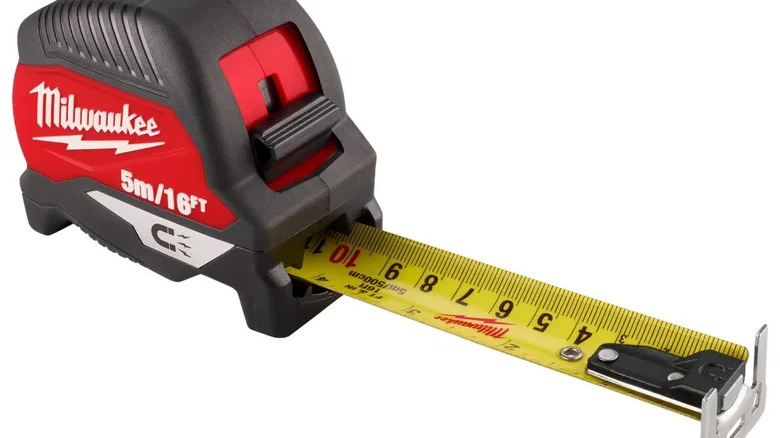
While the hook slot is a standard feature, some tape measures take it a step further with magnetic hooks. For example, the Milwaukee 25-foot Wide Blade Magnetic Tape Measure comes equipped with a magnetic end that adheres to metal surfaces.

  • Why It’s Useful: If you’re working with metal studs, pipes, or other ferrous materials, the magnetic hook provides a secure hold without needing a nail or screw.
  • Considerations: While convenient, magnetic hooks may not be as secure as traditional hook slots, especially when pulling the tape over long distances. However, they’re a great option for quick measurements on metal surfaces.

Investing in a high-quality tape measure with a magnetic hook can make your projects more efficient, especially if you frequently work with metal materials.


The Black Diamonds: A Pro Tip for Framing

Have you ever noticed the small black diamonds on your tape measure? These aren’t just decorative—they’re a handy reference for framing and construction.

  • What They Mean: The black diamonds are spaced 19.2 inches apart, which is a common spacing for roof trusses and floor joists in construction. This spacing allows for five trusses or joists over an 8-foot span, providing optimal structural support.
  • How to Use Them: If you’re working on a framing project, these diamonds can help you quickly mark out the correct spacing without needing to measure each time.

This feature is a testament to the thoughtful design of tape measures, catering to both DIYers and professionals alike.


Laser Measures: A High-Tech Alternative

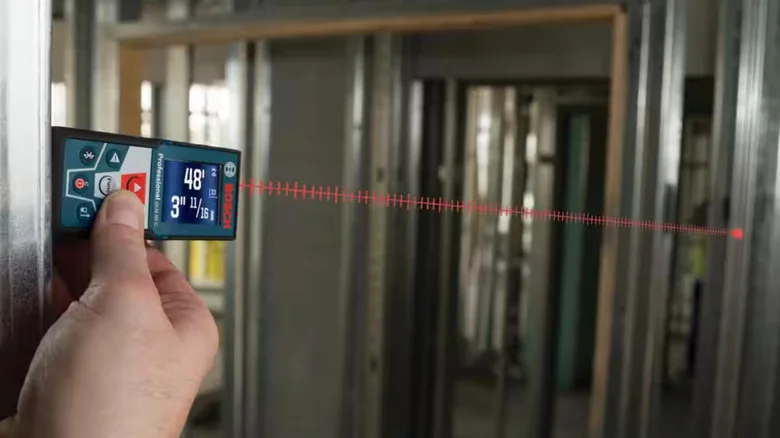
While traditional tape measures are reliable, laser distance meters offer a modern alternative for certain tasks. Brands like Milwaukee also produce laser measures, which come with their own set of advantages and limitations.

  • Pros:
    • Speed: Laser measures can quickly determine distances, making them ideal for large-scale projects.
    • Long Distances: They can measure much longer distances than a standard tape measure.
    • Solo Use: No need for a second person or a hook slot—just point and shoot.
  • Cons:
    • Accuracy: Laser measures can be less precise for short distances.
    • Line of Sight: They only measure straight lines, so they’re not suitable for curved surfaces.
    • Power Dependency: Unlike a tape measure, laser devices require batteries or charging.

While laser measures are a great addition to your toolkit, they shouldn’t replace a traditional tape measure entirely. Having both options ensures you’re prepared for any measuring task.


Why Quality Matters: Choosing the Right Tape Measure
Not all tape measures are created equal. Cheap models may offer the same basic features, but they often lack the durability and precision of higher-quality options. Here’s why investing in a good tape measure is worth it:

  • Durability: High-quality tapes are made from sturdy materials that resist sagging, even when extended over long distances.
  • Accuracy: A reliable tape measure ensures your measurements are precise, reducing the risk of errors in your projects.
  • Additional Features: Premium models often include extra features like magnetic hooks, wide blades for better visibility, and ergonomic designs for comfortable use.

For example, the Milwaukee 25-foot Wide Blade Magnetic Tape Measure is a standout choice for its robust construction and innovative features.


Final Thoughts: Mastering Your Tape Measure

Understanding the hidden features of your tape measure can transform the way you approach DIY projects and professional tasks. From the versatile hook slot to the framing-friendly black diamonds, these small details are designed to make your life easier.

Whether you stick with a traditional tape measure or explore high-tech options like laser distance meters, having the right tools and knowledge ensures you’re always prepared. So, the next time you reach for your tape measure, take a moment to appreciate its clever design—and put those hidden features to good use!


ADVERTISEMENT
RECOMMENDED
NEXT UP

Apple’s entry-level iPad has just become its most compelling deal ever, dropping to a **record-low price of 299∗∗(normally299∗∗(normally349) at major retailers including Amazon, Walmart, and Best Buy. For anyone needing a reliable, no-frills tablet for everyday tasks—streaming, web browsing, light productivity, and video calls—this is one of the best tech bargains of the year.

What’s New in the 11th-Gen iPad?

Compared to its predecessor, Apple’s latest budget iPad brings meaningful upgrades that make it a much better long-term investment:

✔ A16 Bionic Chip – The same processor powering the iPhone 14, delivering smoother performance for multitasking and apps.
✔ 128GB Base Storage – Double the 64GB of the 10th-gen model—no more constant storage anxiety.
✔ 11-inch Liquid Retina Display – More screen space for movies, reading, and productivity.
✔ Improved 12MP Front Camera – Better for Zoom calls and FaceTime.
✔ USB-C Apple Pencil Support – Great for note-taking and light creative work.

Who Should Buy This iPad?

✅ Students – Perfect for note-taking (with Apple Pencil), research, and streaming lectures.
✅ Casual Users – Ideal for browsing, social media, and video streaming.
✅ Remote Workers – A solid secondary device for emails, Slack, and video calls.
✅ Families – A durable, long-lasting tablet for kids’ entertainment and learning.

What You’re Missing (And Why It Might Not Matter)

As Apple’s most affordable tablet, the 11th-gen iPad lacks some premium features:

❌ No Apple Intelligence (AI Features) – Only newer iPads (Pro, Air) support Apple’s upcoming AI tools.
❌ No Apple Pencil Pro Support – The USB-C Pencil works fine, but you miss extras like Find My and squeeze gestures.
❌ Non-Laminated Display – Slightly thicker bezels and less premium feel than the iPad Air.

But here’s the thing: If you just need a fast, dependable tablet without the bells and whistles, these omissions won’t affect your experience.

Is This the Best Budget Tablet in 2024?

iPad vs. The Competition

Feature11th-Gen iPad ($299)Samsung Galaxy Tab S9 FE ($399+)Amazon Fire Max 11 ($229)
PerformanceA16 Bionic (Very Fast)Exynos 1380 (Mid-Range)Mediatek (Basic)
Display11″ Liquid Retina10.9″ LCD11″ LCD
Stylus SupportUSB-C Apple PencilS Pen IncludedNo Precision Stylus
SoftwareiPadOS (5+ Years Updates)One UI (Slower Updates)Fire OS (Limited Apps)
Best ForAll-around useAndroid fansPrime Video & Kindle users

Verdict: If you want long-term software support, better performance, and Apple ecosystem benefits, the iPad is still the best value.

Final Recommendation

For $299, the 11th-gen iPad is a no-brainer for casual users. It’s fast enough for daily tasks, has great battery life, and will receive updates for years. Unless you need AI features or a pro-level stylus, this is the best cheap iPad deal right now.

In a major win for smart home enthusiasts, SwitchBot has announced plans to integrate over 45 of its products with Home Assistant in the first half of 2024. This move, confirmed in an email to The Verge, underscores SwitchBot’s commitment to interoperability and user flexibility in the rapidly evolving smart home ecosystem. Among the highlighted devices is the highly anticipated SwitchBot Hub 3, which was recently revealed in a filing with the Connectivity Standards Alliance.

What’s New in SwitchBot’s Home Assistant Integration?

SwitchBot’s integration rollout, set to begin in April, will include some of its most popular devices, such as:

  • Robot Vacuum K10 Plus Pro: A powerful cleaning solution that can now be seamlessly controlled via Home Assistant.
  • Curtain 3 Smart Shades: Automate your window treatments with precision and ease.
  • Garage Door Opener: Add your garage to your smart home network for enhanced security and convenience.

These new integrations will join existing SwitchBot devices like the SwitchBot Lock Pro, which already supports Home Assistant. This expansion not only enhances the functionality of SwitchBot’s ecosystem but also solidifies its position as a leader in the smart home industry.

Why This Matters for Home Assistant Users

Home Assistant, an open-source platform beloved by tech-savvy users, thrives on its ability to unify devices from various brands under one roof. However, integrations with major smart home players can often be fragile. Companies sometimes make undocumented software changes or actively block third-party integrations, leaving users frustrated.

SwitchBot’s proactive approach to integrating its devices with Home Assistant is a breath of fresh air. By officially supporting these integrations, SwitchBot ensures a stable, reliable, and user-friendly experience. This is particularly important for Home Assistant users who value customization and control over their smart home setups.

The Bigger Picture: A Shift Toward Open Ecosystems

SwitchBot’s announcement reflects a growing trend in the smart home industry: the push for open ecosystems and interoperability. As more consumers demand seamless integration across devices, companies like SwitchBot are stepping up to meet these expectations. This move not only benefits users but also fosters innovation and competition in the market.

For Home Assistant users, this means greater flexibility and fewer headaches. Instead of relying on fragile community-created integrations, they can now enjoy official support for a wide range of SwitchBot devices. This is a win for both convenience and reliability.

What’s Next for SwitchBot and Home Assistant?

With the first wave of integrations launching in April, users can look forward to a more cohesive and powerful smart home experience. The inclusion of devices like the Robot Vacuum K10 Plus Pro and Curtain 3 Smart Shades demonstrates SwitchBot’s dedication to enhancing everyday life through technology.

As the smart home landscape continues to evolve, partnerships like this one between SwitchBot and Home Assistant will play a crucial role in shaping the future of connected living. For now, smart home enthusiasts have plenty to be excited about as SwitchBot brings its innovative products into the Home Assistant fold.

ADVERTISEMENT
Receive the latest news

Subscribe To Our Weekly Newsletter

Get notified about new articles